👨💻Building a Real-Time Budget Tracker on My Homelab
- Published on
- • 7 min read
Building a Real-Time Budget Tracker on My Homelab
The Problem
Every budgeting app I tried had the same friction: connect your bank through Plaid, wait for transactions to sync (sometimes days), deal with flaky connections that randomly disconnect, and watch pending transactions disappear and reappear as they post. Credit cards were the worst; you'd see a pending charge, then it vanishes, then it comes back days later as "posted." By the time your budget updates, you've already overspent.
I wanted something different: real-time transaction tracking the moment my credit card is charged, no Plaid, no third-party connections, no waiting. And I wanted it running entirely on my own hardware with no financial data leaving my home network.
What I Built
A fully automated budget tracking system that:
- Scrapes credit card alert emails in real-time from BMO and Rogers via Fastmail's JMAP API
- Categorizes transactions automatically using Ollama (local AI) running on my homelab, no cloud AI, no data leaving my network
- Sends me a Telegram message when the AI isn't confident about a category, letting me tap a button to categorize it instantly
- Consolidates all credit cards into one dashboard: the shared BMO, Rogers, and even cash transactions
- Generates monthly spending reports broken down by category and card
- Runs entirely locally on a Proxmox homelab with Docker containers
- Accessible to both my wife and me through a secure web app at myapps.kien.dev, protected by Cloudflare Zero Trust
The Stack
- Frontend: Next.js 14, React, TypeScript, Tailwind CSS, Recharts, Framer Motion
- Database: PocketBase (stored on Synology NAS for persistence)
- Automation: n8n (workflow automation)
- AI Categorization: Ollama with phi4-mini (fully local, private)
- Notifications: Telegram Bot API
- Infrastructure: Proxmox, Docker, Cloudflare Tunnel + Zero Trust, Nginx Proxy Manager
- Email: Fastmail with JMAP API
System Architecture
🌐 INTERNET
📱 Phone / 💻 Browser → app.kien.dev
        |
        v
 [ ☁️ Cloudflare / Zero Trust / Google SSO ]
        |
        v
 [ 🔀 Nginx Proxy Manager ]
        |
        v
+--------------------------------------+
| 🏠 HOMELAB (Proxmox + Docker LXC)    |
|                                      |
| +------------+    +---------------+  |
| | Next.js    |--->| PocketBase    |  |
| | Port 3100  |    | Port 8090     |  |
| | (public)   |    | (internal)    |  |
| +------------+    | on Synology   |  |
|                   +------^--------+  |
| +------------+           |           |
| | n8n        |-- writes -+           |
| | Port 5678  |                       |
| |            |--> Fastmail (JMAP)    |
| |            |--> Ollama (phi4-mini) |
| |            |--> Telegram Bot       |
| +------------+                       |
+--------------------------------------+
How It Works
1. Email Scraping (Every 30 minutes)
n8n connects to Fastmail via JMAP API and scans my BMO Alerts and Rogers Alerts folders for new transaction notification emails. Each bank sends alerts the moment a charge hits, no waiting for transactions to post.
2. Smart Parsing
The workflow parses different email formats from each bank, extracting merchant name, amount, card number, and date. Duplicate detection ensures the same transaction is never processed twice.
3. AI Categorization (Fully Local)
Each transaction runs through a two-tier system:
- Vendor map (instant): Known merchants like Fortinos → Groceries, Petro-Canada → Transportation
- Ollama fallback: Unknown merchants get categorized by a local AI model, no data sent to OpenAI or any cloud service
4. Human-in-the-Loop via Telegram
When the AI isn't confident, I get a Telegram message with inline buttons for every category. One tap and it's categorized. The message updates in-place to confirm.
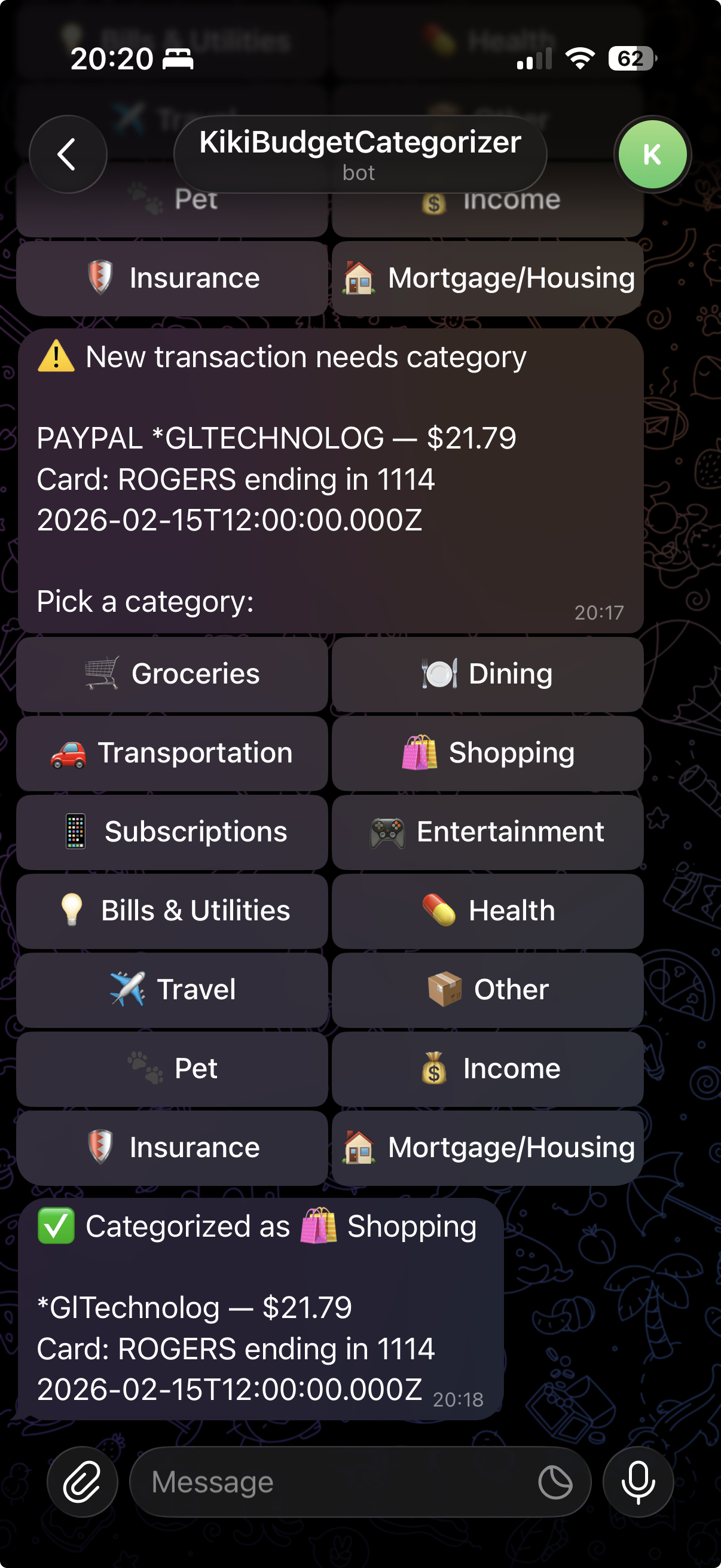
5. Real-Time Dashboard
The Next.js frontend shows spending by category, by card, and by month with animated pie charts and smooth transitions. My wife and I both access it through Google SSO, protected by Cloudflare Zero Trust.
6. Monthly Reports
n8n automatically aggregates transactions into monthly summaries; both overall and per-card breakdowns. The dashboard recalculates whenever a new transaction is added or recategorized.
Key Highlights
- No Plaid, no third-party bank connections: just email alerts that arrive in seconds
- 100% private: all financial data stays on my home network, AI runs locally on Ollama
- Real-time: transactions appear within 30 minutes of being charged (limited only by n8n's polling interval)
- Multi-card consolidation: all credit cards in one view
- Shared access: my wife and I both use it through a secure web app
- Reverse proxy pattern: PocketBase database is never exposed to the internet; Next.js proxies all requests internally
- NAS-backed storage: database lives on Synology NAS, survives any container rebuild
- Telegram integration: interactive categorization without opening the app
What I Learned
This project was as much about learning as it was about solving a problem.
OAuth 2.0 from scratch: I'd used "Sign in with Google" buttons a hundred times as a user, but never wired one up myself. Setting up Google OAuth meant understanding the full flow: client IDs, redirect URIs, authorization codes, and token exchange. When I moved from local development to Docker, the redirect URLs broke because PocketBase couldn't figure out its public-facing URL behind a reverse proxy. Debugging that taught me more about OAuth than any tutorial could.
PocketBase as a backend: As a frontend developer, I've always relied on teams to handle the backend. PocketBase gave me a full database, auth system, and REST API in a single binary. No migrations to write, no ORM to configure, no server framework to set up. I went from zero to a working API in minutes. The admin UI made it easy to inspect data, create collections, and test queries without writing any code. It's the backend equivalent of what Next.js did for React, it just gets out of your way and is dead simple.
Self-hosting everything: Before this project, "deployment" meant pushing to Vercel or Netlify. Now I understand Docker compose files, container networking, bind mounts vs named volumes, Cloudflare tunnels, reverse proxies, and why your database should never be exposed to the internet. The moment my wife opened the app on her phone through Cloudflare Zero Trust and saw our real spending data (served from a mini PC in our living room) that was genuinely satisfying.
Why n8n?
I'm a developer by trade. I write code all day. The last thing I want to do after work is open an IDE and build another data pipeline from scratch. I could have written a Node.js service with cron jobs, queue workers, and API integrations, but I've done enough of that professionally. I wanted to solve a personal problem without it feeling like work.
n8n hit the sweet spot:
- Self-hosted: runs on my homelab, no SaaS subscription, my data stays local
- Visual debugging: when something breaks, I click the failing node and see exactly what went wrong. No digging through logs, no stack traces, no
console.logdebugging. Each node shows its input and output, step by step - Pre-built integrations: HTTP requests, webhooks, code nodes, scheduling, IF/Switch logic, all drag and drop. I didn't write a single line of JMAP client code or Telegram bot framework. I just pointed HTTP nodes at the right URLs
- Low maintenance: no dependency updates, no build pipeline, no deploy scripts for the automation layer. The workflows just run
- Rapid iteration: I can test a single node in isolation, tweak it, and re-run without restarting anything.
Building the entire email → AI → database → Telegram pipeline took hours, not days
The visual workflow approach also made it easy to extend. When I wanted to add Rogers credit card support alongside BMO, I added one more folder ID to the input node. When I wanted vendor mapping to skip the AI for known merchants, I dropped in an IF node. Each change is isolated and visible.
Could I have built all of this in pure code? Absolutely. But n8n let me build it in an evening while watching TV on the couch and that's exactly the energy I want for personal projects.
n8n Workflows
Workflow 1: Ingest Transactions
Fetch Emails → Parse → Dedup → Vendor Map → Ollama → Write to PocketBase → Telegram (if needed)
Workflow 2: Handle Telegram Callbacks
Webhook → Parse Button Tap → Update Category → Edit Message → Recalculate Summaries
Workflow 3: Rebuild Monthly Summaries
Trigger/Cron → Fetch Transactions → Aggregate by Category → Delete Old → Write New Summaries
What's Next
- Telegram /add command for manually adding cash transactions
- Subscription tracking separating fixed costs from cancellable subscriptions
- Historical data import from CSV bank statements
Now I'm on the hunt for a new server machine with better hardware so that I can run multiple LLM models for fun and continue building with LLMs to solve my very mundane problems.